Tuesday, March 31, 2015

Photoshop & Photography Day 3

Today was the last day of Photoshop & Photography and the kids are definitely Photoshop masters now!

Behold!


Thursday, March 26, 2015

Photoshop & Photography Day 2

Day 2 of Photoshop and Photography is in the can and wow did we make some cool stuff!

We learned how to use the Lasso tool in Photoshop to cut the subjects out of our photos and plop them into crazy backgrounds.  There's definitely an art to this stuff!


Tuesday, March 24, 2015

Photoshop & Photography

Today we started Photoshop & Photography by learning how to take cool pictures, taking cool pictures and then editing our cool pictures!

We'll be doing this class for the next week or so and we'll have lots of cool pics to post on this blog so stay tuned!


Friday, March 13, 2015

Teen Tech Week Day 5 - Open Lab

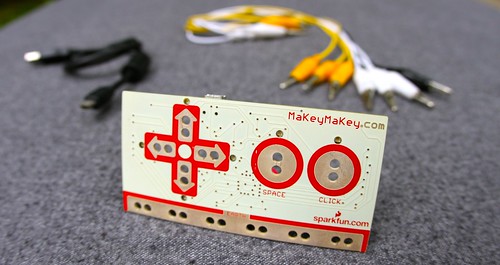
Today was our Open lab day and we spent the whole time playing with Makey Makey's!

Matt hooked his Makey Makey up to Minecraft and used it to successfully control his character!


Ahren hooked his Makey Makey up to Mixcraft and used it to play all of the virtual instruments!

Can't wait until next time!


Thursday, March 12, 2015

Teen Tech Week Day 4 - Photoshop Facepaint

Today we did a tried and true PNG staple: Photoshop Facepaint!

The kids started out with selfies (or grabbing images off the web) and printed them out, then traced over them and scanned the tracing.  Once the scans were digitized they pulled them into Photoshop and re-colorized them.  The results are pretty cool!


Wednesday, March 11, 2015

Teen Tech Week Day 3 - BristleNOTs

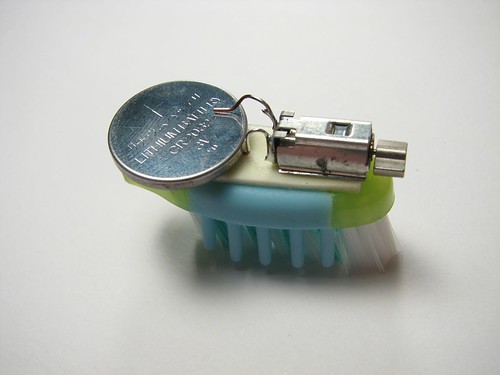
Well, today we were supposed to put together our own Bristlebots. But that didn't pan out because we don't have any motors!


We decided to do Tinkercad instead and had a lot of fun!

Tuesday, March 10, 2015

Teen Tech Week Day 2: Hour of Code

It may sound boring, but Code.org's Hour of Code activities are a lot of fun!

Today we spent the second day of Teen Tech Week learning some basic coding!

Monday, March 9, 2015

Teen Tech Week Day 1: MaKey MaKey


Today is the first day of Teen Tech Week!  We started things off easily enough with an introduction to MaKey MaKey.  You may have read about us using MaKey MaKey's in our last class, but this is a new group (mostly) so we wanted to let people see what they missed.

Thursday, March 5, 2015

We Made a Beat

Behold our finished songs!  Be gentle with your criticism, these were valiant attempts.


Tuesday, March 3, 2015

Let's Continue to Make a Beat

Once again our recording artists picked up today where we left off.  After today there is only 1 day left and we'd like to use most of Thursday's class to get the songs uploaded to our SoundCloud page.

The anticipation builds along with the tracks!

Thursday, February 26, 2015

Let's Make a Song!

We finally made a beat!  Every student has their recorded and put into the software.  Now comes the easy part of building an entire song around it!

Needless to say I went ahead and booked two extra days for this class because I don't think we would have enough time to finish today.  Or at least if we did, I don't think you the listener would really be enthusiastic about hearing these early results.

Stay tuned!

Tuesday, February 24, 2015

Angie Day

Angie was the only one who showed up today so she got full undivided attention and got further than anyone else on her song.

First thing we did was record the beat she made on her MaKey MaKey over at www.makeymakey.com/bongos then we fed that audio into Mixcraft and turned it into a sample loop.

Then we found the beats per minute (BPM) of the song and started pulling in other samples from the sound library to go with it!

We're off to a great start, although I'm not 100% sure that we'll be able to finish on Thursday.  We might have to add a couple more classes if we want to finish this right!

Thursday, February 19, 2015

Makey Makey Music

Today we continued making music with our Makey Makey instruments.  Today was also an introduction to Acoustica's Mixcraft software.

If you're familiar with Apple's Garageband then you'll be somewhat familiar with how Mixcraft works.

Today we tried not only recording our Makey Makey instruments into Mixcraft but also using our Makey Makey to play Mixcraft's virtual instruments.

Tuesday, February 17, 2015

Let's Make a Beat!

What do you get when you combine Makey Makey's, music and audio software called Mixcraft?


I have no idea, but over the next 4 classes we are going to find out!

First we're going to take these Makey Makey's and use them to play some drums and bongos over here.

Then we're going to record that and see if we can build a song out of it and upload it to our Soundcloud page!


Thursday, February 12, 2015

Valentine's 3-Day

Today the kids made a ridiculous amount of 3D designs.  I have no idea when we'll ever be able to print them all out on the Makerbot, but we will try over the next few weeks.  Our Makerbot is acting a bit crazy, but we'll get it sorted out.


Tuesday, February 10, 2015

Valentine's 3-Day

Today we made 3D valentine charms on the computer using Cubify's web-based 3D object generator.

This is very similar to the activity we did for 3D holiday ornaments.  Between today and next class on Thursday Ahren will try to print out the student's designs on the 3D printer.

The results are usually mixed but we'll see how it goes!

Monday, February 9, 2015

Vinyl Superheroes

Today we celebrated superheroes by making silhouettes out of images from the Internet and running them through our vinyl cutter and then applying the results to a nice piece of canvas.

Omar got the idea from this picture:

The results are pretty fantastic!


Wednesday, February 4, 2015

You can't spell SPRING without PNG!

Thanks to our record snowfall and frigid weather we've been thinking a lot about Spring lately.  We're excited to announce our upcoming PNG programs for Spring 2015!

First up in March is Teen Tech Week!  Project Next Generation at Elmwood Park Public Library is doing our part to get teens involved in technology with a whole week's worth of classes, everyday from 4pm to 5pm.

Teen Tech Week:

March 9th (4pm - 5pm) - Makey Makey 
Makey Makey's are cool kits that allow you to hook everyday objects up to computers at input devices!  The possibilities of what you can do are pretty much limitless.  We'll show you some cool basic ways to use a Makey Makey kit and some fun activities to try and then we'll let you try to come up with something cool and new!
March 10th (4pm - 5pm) - Hour of Code
Not only is coding massively important to the fabric of your digital world, coding can also be pretty fun!  Sign up for this quick introduction to activities on Code.org and play fun games while learning the fundamentals of basic coding! 
March 11 (4pm - 5pm) - Bristle Bots 
What happens when you combine a toothbrush, a tiny motor and an electric current?  Bristle Bots!  Sign up to construct your very own Bristle Bot and then race them against your classmates! 
March 12 (4pm - 5pm) - Photoshop Face Paint 
Join this Project Next Generation class if you want to learn Adobe Photoshop basics.  We'll use a combination of cameras, tracing on paper, and photoshop to produce a one-of-a-kind self portrait! 
March 13 (4pm - 5pm) - Open Lab 
We're throwing the doors open and letting you repeat any of the activities from Teen Tech Week or maybe try out some things we didn't get around to.  The PNG Lab is open, come and play!

March

Photoshop & Photography - Tuesdays & Thursdays, March 24th, 26th & 31st 4pm - 5pm

Let's use cameras to take digital photos and then edit those photos in Photoshop!  We'll teach you the basics of how to compose a photograph and how to use Photoshop to edit your subject into all kinds of crazy backgrounds and special effects!

April 

Soldering - Tuesdays & Thursdays, April 2nd, 7th, & 9th 4pm - 5pm

Join this Project Next Generation class if you want to learn how to solder!  We've got cool electronics kits that light up, drive and scurry.  When you're finished you can take your creation home with you and you'll be an expert in circuitry and soldering!

Tinkercad - Tuesdays & Thursdays, April 21st, 23rd, 28th, & 30th 4pm - 5pm

Let's use the computer to create 3D models and then print them out on the Makerbot Replicator!  This 4-part class will teach you the basics of 3D design and how to use Tinkercad.com to create 3D objects that can be printed on any 3D printer!


May


Superheroes - Tuesday & Thursday, May 12th & 14th 4pm - 5pm

Just in time for a new crop of summer-time superhero movies, we're going to make our own superheroes on the computer and then print vinyl silhouettes of our creations using PNG's Silhouette Cameo vinyl cutter!

Thursday, January 29, 2015

App Design

Today we continued working on our apps.  Progress is pretty slow, but we're getting there.  Maybe if we're lucky we'll get to start uploading the mockups of our app pages to Marvel App so that we can make a half-way functional prototype.  Here's hoping!


Tuesday, January 27, 2015

Vinyl Cutting!

Today the kids got to check out the cool world of Vinyl Cutting.  No, we're not talking about spinning records on the wheels of steel, we're talking about the Silhouette Cameo Vinyl Cutter.  This little machine is a lot like a desktop printer but designed specifically to cut fabric and vinyl!

We've been using the vinyl cutter here at the library for a while now, so we enlisted our resident expert Omar to help out.  Check out the cool results!